Island Announcement
Display a dismissible announcement below the floating island header. This section is best used with the Interactive island header style and is not intended for the traditional header layout.
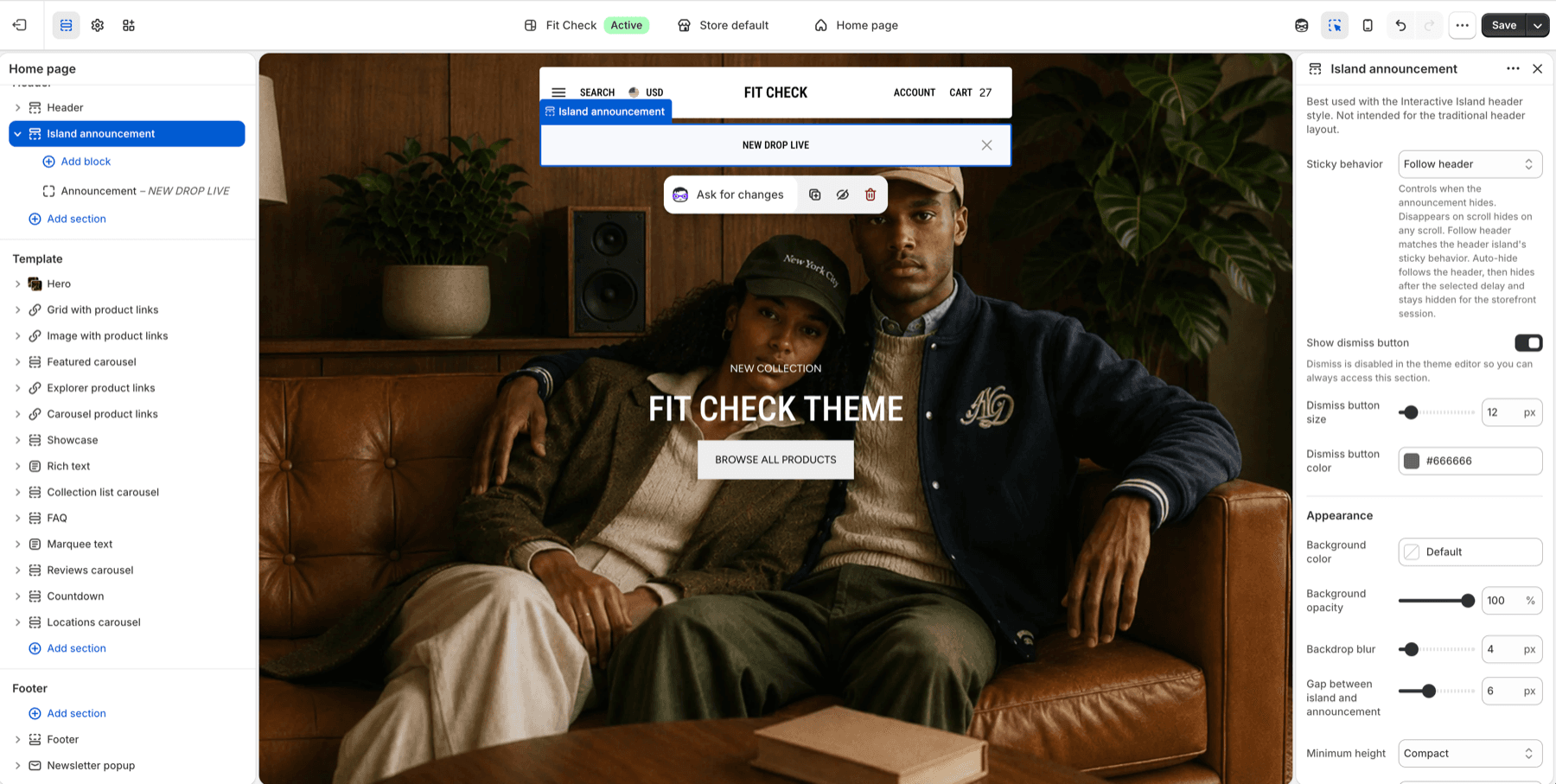
Configure the Section
- In the theme editor, set the Header section to Interactive island style.
- Click Add section in the header area.
- Select Island announcement.
- Add an Announcement block, or use an email signup block when the announcement should collect email addresses.
Section Settings
| Setting | Description |
|---|---|
| Sticky behavior | Choose Disappears on scroll, Follow header, or Auto-hide after delay. Default: Follow header. |
| Delay seconds | Auto-hide delay when Sticky behavior is Auto-hide after delay. Range: 2-20s. Default: 6s. |
| Show dismiss button | Let visitors dismiss the announcement for the storefront session. Dismissal is disabled in the theme editor. Default: On. |
| Dismiss button size | Size of the dismiss icon. Range: 10-32px. Default: 12px. |
| Dismiss button color | Color of the dismiss icon. Default: #666666. |
| Background color | Optional custom background. Leave Default to use the theme surface. |
| Background opacity | Announcement background opacity. Range: 0-100%. Default: 90%. |
| Backdrop blur | Glass-effect blur behind the announcement. Range: 0-40px. Default: 4px. |
| Gap between island and announcement | Space between the floating header island and the announcement. Range: 0-16px. Default: 6px. |
| Minimum height | Choose Compact, Default, or Spacious. Default: Default. |
| Border color | Optional border color. Leave Default for no custom border. |
| Border opacity | Border transparency when a border color is selected. Range: 0-100%. Default: 100%. |
| Use same padding top and bottom | Keep top and bottom spacing linked. Default: On. |
| Padding | Top and bottom padding when unified. Range: 0-100px. Default: 8px. |
| Top / Bottom | Independent padding controls when unified padding is off. Range: 0-100px. Default: 8px each. |
Blocks
Announcement Block
Add a short message with optional linked text. Multiple announcement blocks render as a compact slider inside the island.
Email Signup Block
Add an email signup form when the announcement should collect subscribers or promote a discount. Keep the message short so the island stays compact on mobile.
Header Pairing
Use Island announcement with the Header section’s Interactive island style. If your store uses the traditional full-width header, use Announcement slider or Announcement marquee instead.
In 1.8.0, a floating header group can also contain an ordinary Announcement slider or Announcement marquee. The ordinary announcement receives layout space and the header above it uses regular configured colors. An Island-only group retains its floating positioning and sticky behavior. Preview the chosen section order, Island dismissal and scroll behavior on desktop and mobile. See Header pairing guidance and Latest updates for release details.