Hero Banner
A full-width hero section with image or video backgrounds, overlay controls, and flexible content layout. Ideal for homepage headers, campaign landing pages, and featured promotions.
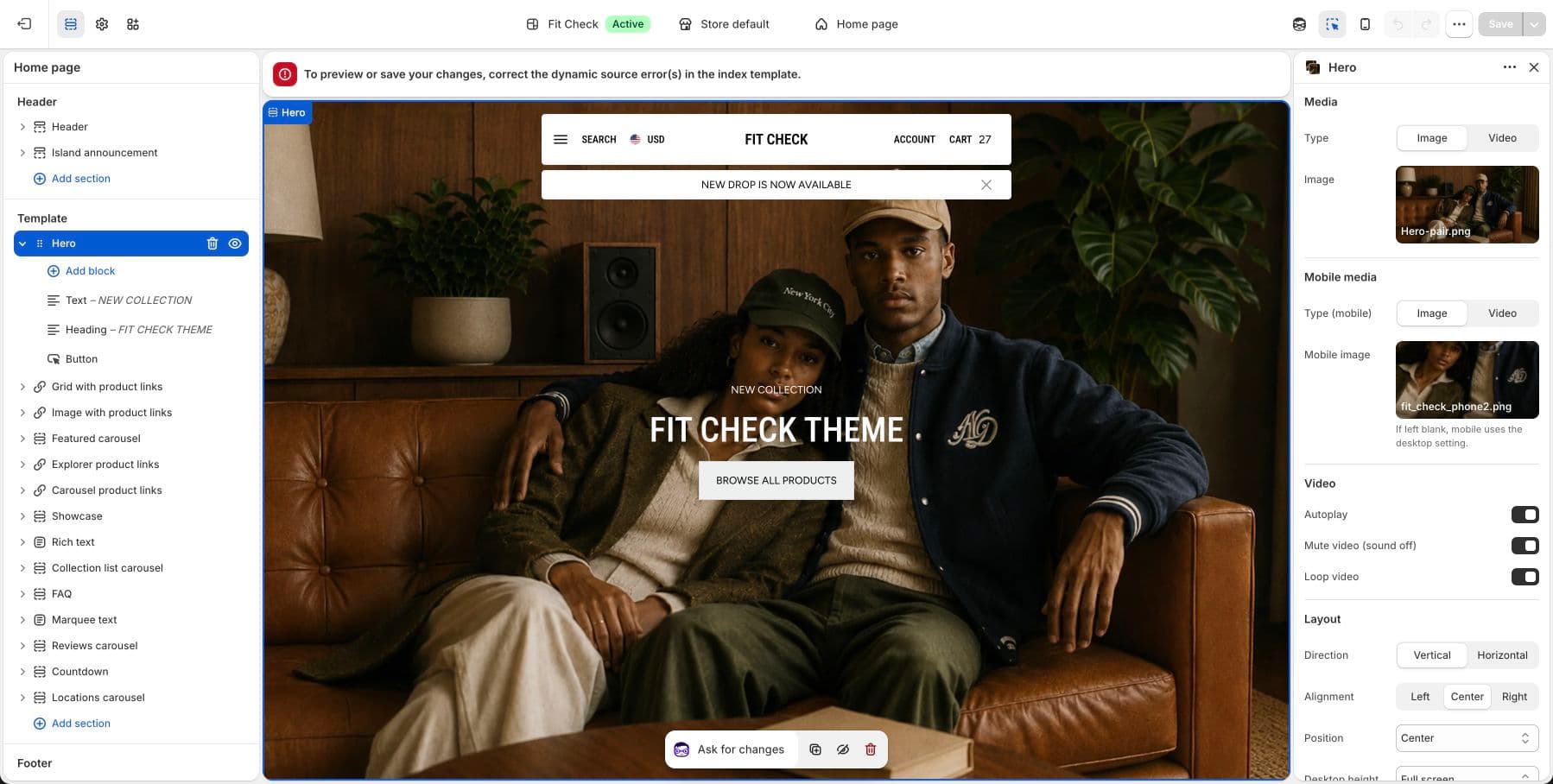
Configure the Section
- In the theme editor, click Add section.
- Select Hero banner.
Section Settings
Media
| Setting | Description |
|---|---|
| Desktop media type | Image or Video. Default: Image. |
| Desktop image | Upload a hero background image for desktop. |
| Desktop video | Select a Shopify-hosted video for desktop. |
| Mobile media type | Image or Video. Default: Image. Falls back to desktop media if blank. |
| Mobile image | Upload a separate image for mobile devices. |
| Mobile video | Select a Shopify-hosted video for mobile devices. |
| Video autoplay | Auto-play video on page load. Default: On. |
| Video muted | Mute video by default. Default: On. |
| Video loop | Loop video playback. Default: On. |
Layout
| Setting | Description |
|---|---|
| Content direction | Column (stacked) or Row (side by side). Default: Column. |
| Desktop height | Auto, Full screen, or Custom. Default: Full screen. |
| Desktop custom height | Height percentage when using Custom. Range: 0–100%. Default: 50%. |
| Mobile height | Auto, Full screen, or Custom. Default: Full screen. |
| Mobile custom height | Height percentage on mobile when using Custom. Range: 0–100%. Default: 50%. |
| Stack on mobile | Collapse row layout to stacked on mobile. Default: On. |
| Content gap | Spacing between content blocks. Range: 0–100px. Default: 12px. |
Alignment
Alignment settings change depending on the content direction.
| Setting | Description |
|---|---|
| Horizontal alignment (Row) | Start, Center, End, or Space between. Default: Center. |
| Vertical alignment (Row) | Start, Center, or End. Default: Center. |
| Horizontal alignment (Column) | Start, Center, or End. Default: Center. |
| Vertical alignment (Column) | Start, Center, End, or Space between. Default: Center. |
Appearance
| Setting | Description |
|---|---|
| Overlay colors | Set overlay text and background colors where the section exposes local color controls. |
| Show overlay | Display a dark overlay on the background media. Default: On. |
| Overlay color | Color and opacity of the overlay. Default: semi-transparent black. |
| Padding | Use one all-sides value or set top, bottom, left, and right independently. Range: 0–100px. Default: 0px. |
Blocks
| Block | Description |
|---|---|
| Text | Add heading, subheading, or body text over the hero. |
| Button | Add a call-to-action button. |
| Logo | Display a logo or badge on the hero. |
| Container | Group multiple blocks in a container for layout control. |