Cart template
Use the Cart template for the full cart page. The header opens the cart drawer. Add a real product variant to the preview cart to see line and subtotal controls.
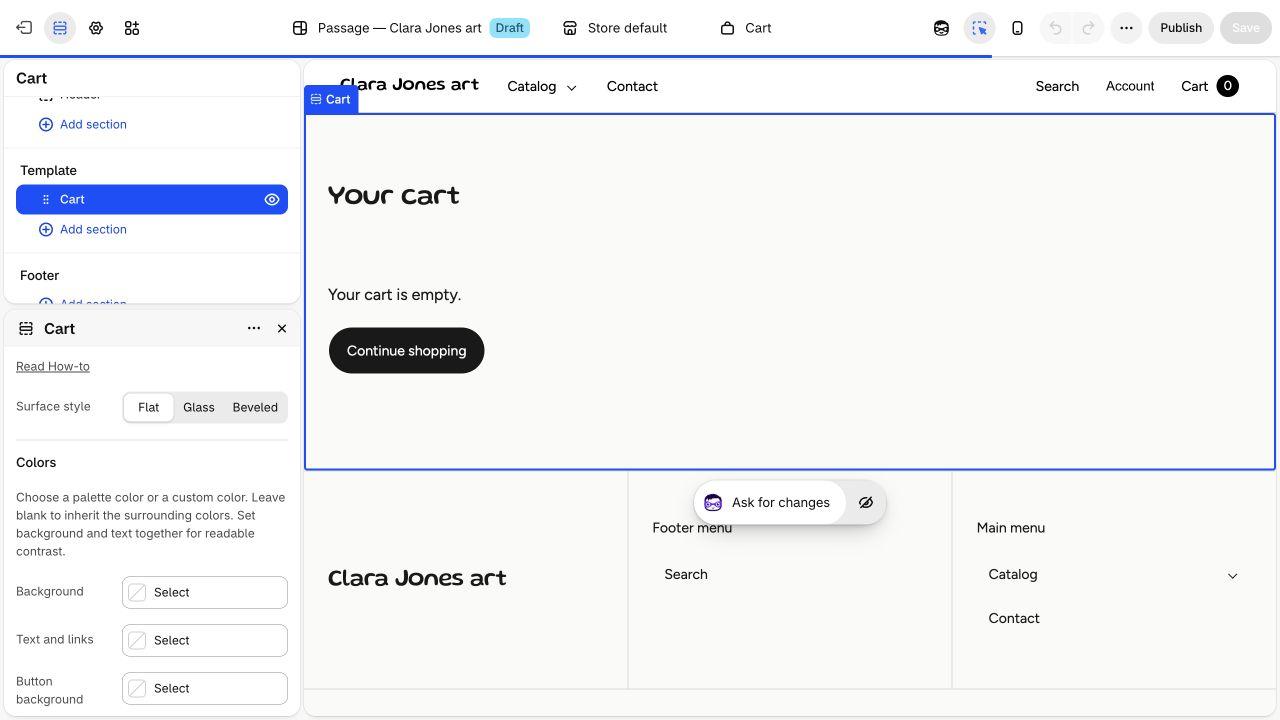
Style the page
Choose Surface style, then pair Background with Text and links and Button background with Button text. Check quantity controls and the Checkout action on small screens. The header uses its own settings for the cart button and the surrounding panel.
Verify the buying flow
- Add a product and check the name, selected options and price.
- Update quantity and verify the subtotal. Where shown, enter an order note and save it.
- Check discounts, selling plans, unit prices and public line details if your store uses them.
- Remove the item and check the empty state.
- Add an item back and follow the Shopify checkout handoff.
See Cart and checkout for payment, pickup and account checks.
Settings overview
General
| Setting | Description | Options |
|---|---|---|
| Surface style | Sets the finish of the full cart page’s surfaces. | Flat, Glass, Beveled. |
Colors
| Setting | Description | Options |
|---|---|---|
| Background | Sets the section background. Leave blank to use its inherited color. | Palette color or custom color. |
| Text and links | Styles the section’s text and links. Check it against the background. | Palette color or custom color. |
| Button background | Sets the action button fill where this section displays a button. | Palette color or custom color. |
| Button text | Sets the button label color. Choose a color that reads clearly on the button fill. | Palette color or custom color. |