Review chapter
Pair testimonials or customer images on a spread.
Available in Hero Book.
Set up the block
Use approved review text and attribution for each page. Preview both pages and the chapter’s Contents entry.
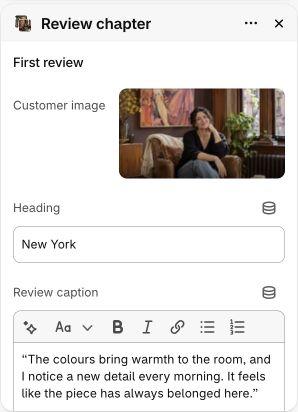
Settings overview
First review
| Setting | Description | Options |
|---|---|---|
| Customer image | Selects the customer image shown on the first page. | Shopify image picker. |
| Heading | Sets the title shown with this content. | Plain text. |
| Review caption | Sets the review copy and attribution on the first page. Add the review and customer attribution. Use only approved testimonials; label sample content clearly. | Formatted text. |
Second review
| Setting | Description | Options |
|---|---|---|
| Customer image | Selects the customer image shown on the facing page. | Shopify image picker. |
| Heading | Sets the heading on the facing review page. | Plain text. |
| Review caption | Sets the review and attribution on the facing page. Add the review and customer attribution. Use only approved testimonials; label sample content clearly. | Formatted text. |
Navigation
| Setting | Description | Options |
|---|---|---|
| Chapter navigation image | Sets the thumbnail in the chapter navigator and Contents. | Shopify image picker. |