Product chapter
Build a shoppable spread around one product.
Available in Hero Book.
Set up the block
Assign the product and artwork, then check the product choices and buy controls. The Product, Details, Materials, and Shipping panels have separate labels and copy.
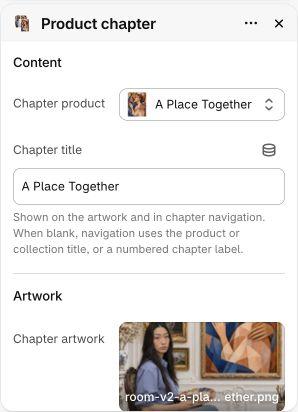
Settings overview
Content
| Setting | Description | Options |
|---|---|---|
| Chapter product | Selects the Shopify product featured or linked in this block. | One Shopify product. |
| Chapter title | Sets the title shown with this content. Shown on the artwork and in chapter navigation. When blank, navigation uses the product or collection title, or a numbered chapter label. | Plain text. |
Artwork
| Setting | Description | Options |
|---|---|---|
| Chapter artwork | Selects the chapter artwork placed on its artwork page. | Shopify image picker. |
| Artwork text | Sets the editorial copy on the artwork page of the spread. Chapter copy shown over the artwork, before the image caption. | Formatted text. |
| Image caption | Adds a caption or credit beneath the content. A description or credit for the artwork, shown after the chapter copy. | Formatted text. |
Tab 1
| Setting | Description | Options |
|---|---|---|
| Label | Names the tab that shows the product and purchase details. Shows the selected product, media and purchase controls. Leave the label blank to use Product. | Plain text. |
Tab 2
| Setting | Description | Options |
|---|---|---|
| Label | Names the Details tab. | Plain text. |
| Content | Sets custom copy for the Details tab. Leave content blank to show the selected product’s description. Enter content to use this tab for something else. | Formatted text. |
Tab 3
| Setting | Description | Options |
|---|---|---|
| Label | Names the Materials tab. | Plain text. |
| Content | Sets the copy for the Materials tab. | Formatted text. |
Tab 4
| Setting | Description | Options |
|---|---|---|
| Label | Names the Shipping tab. | Plain text. |
| Content | Sets the copy for the Shipping tab. | Formatted text. |
Navigation
| Setting | Description | Options |
|---|---|---|
| Chapter navigation image | Sets the thumbnail in the chapter navigator and Contents. | Shopify image picker. |