Collection list chapter
Present several Shopify collections on one spread.
Available in Hero Book.
Set up the block
Select the collections in the order visitors should browse them. Add chapter artwork and check the title in Contents.
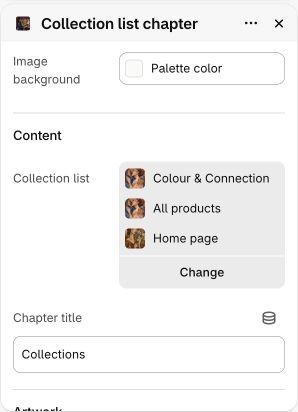
Settings overview
| Setting | Description | Options |
|---|---|---|
| Image background | Sets the surface behind the image. | Palette or custom color. |
Content
| Setting | Description | Options |
|---|---|---|
| Collection list | Selects the collections to display in the spread. | Shopify collection list. |
| Chapter title | Sets the title shown in chapter navigation and where the chapter layout displays it. | Plain text. |
Artwork
| Setting | Description | Options |
|---|---|---|
| Chapter artwork | Selects the chapter artwork placed on its artwork page. | Shopify image picker. |
Navigation
| Setting | Description | Options |
|---|---|---|
| Chapter navigation image | Sets the thumbnail in the chapter navigator and Contents. | Shopify image picker. |