Second page in Gallery chapter
Arrange the Gallery image blocks on the second page.
In the editor, this block is called Second page.
Available in Hero Book.
Set up the block
Add Gallery image blocks beneath Second page and check their order on mobile.
Open Gallery chapter to find this block in context.
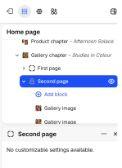
Blocks you can add
Settings overview
| Setting | Description | Options |
|---|---|---|
| No Passage settings | Arrange the child blocks in the editor. | — |