Catalog Product card
Style the built-in Product card used for product results or product rails.
In the editor, this block is called Product card.
Available in Hero Sphere, Featured products, Collection, Search, Product recommendations.
Set up the block
Select the existing Product card inside the section. Its settings apply to all product cards in that section, and the section or template supplies the products.
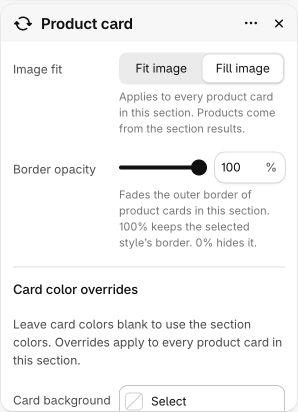
Settings overview
| Setting | Description | Options |
|---|---|---|
| Image fit | Chooses whether the image keeps its proportions within the frame or fills the frame with cropping. Applies to every product card in this section. Products come from the section results. | Fit image, Fill image. |
| Border opacity | Sets how visible the card border is. Fades the outer border of product cards in this section. 100% keeps the selected style’s border. 0% hides it. | 0–100 % in increments of 5. Default 100 %. |
Card color overrides
| Setting | Description | Options |
|---|---|---|
| Card background | Sets the surface color for this block. | Palette or custom color. |
| Image background | Sets the surface behind the image. Shows behind transparent images and around fitted images. Leave blank to show the card background. Images with their own background keep it. | Palette or custom color. |
| Text and links | Sets the foreground color for the text and links in this block. | Palette or custom color. |