Product recommendations
Show related items or complementary products supplied by Shopify.
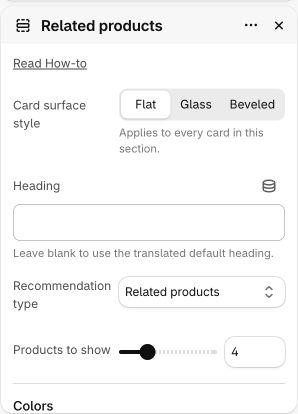
How to customize
Open the product template and select Product recommendations. Choose Recommendation type and set the heading and number of products. Use Shopify Search & Discovery to check the recommendations attached to the previewed item. Preview a product that has matching results.
Blocks
Settings overview
General
| Setting | Description | Options |
|---|---|---|
| Card surface style | Sets the finish used on the section’s cards. | Flat, Glass, Beveled. |
| Heading | The visible heading for this section. | Plain text. |
| Recommendation type | Related products offer alternatives. Complementary products suggest items that go with this product. | Related products, Complementary products. |
| Products to show | Caps the number of products shown. | 2–10. |
Colors
| Setting | Description | Options |
|---|---|---|
| Background | Sets the section background. Leave blank to use its inherited color. | Palette color or custom color. |
| Text and links | Styles the section’s text and links. Check it against the background. | Palette color or custom color. |
| Button background | Sets the action button fill where this section displays a button. | Palette color or custom color. |
| Button text | Sets the button label color. Choose a color that reads clearly on the button fill. | Palette color or custom color. |