Editorial footer
Use the editorial treatment of the shared footer for menus, signup and localization. Choose one footer layout for your store.
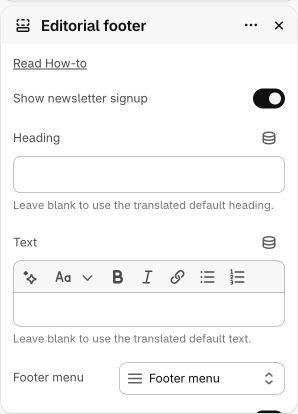
How to customize
- In the Footer group, add Editorial footer where offered.
- Select the primary Footer menu and add Menu column blocks with a heading and menu for each link group.
- Set signup copy and choose the country, language and payment options you want to display. Preview the layout on mobile.
Blocks
Settings overview
General
| Setting | Description | Options |
|---|---|---|
| Show newsletter signup | Shows the Shopify customer signup form. | On or Off. |
| Heading | Sets the invitation heading above the signup form. | Plain text. |
| Text | Adds a short explanation alongside the signup. | Rich text. |
| Footer menu | Selects the Shopify menu for the main footer links. | Shopify menu. |
| Show payment icons | Shows icons for the payment types Shopify makes available. | On or Off. |
| Show language selector | Shows the language selector when the store has multiple available languages. | On or Off. |
| Show country selector | Shows the country selector when Shopify provides multiple choices. | On or Off. |
Colors
| Setting | Description | Options |
|---|---|---|
| Background | Sets the section background. Leave blank to use its inherited color. | Palette color or custom color. |
| Text and links | Styles the section’s text and links. Check it against the background. | Palette color or custom color. |
| Button background | Sets the action button fill where this section displays a button. | Palette color or custom color. |
| Button text | Sets the button label color. Choose a color that reads clearly on the button fill. | Palette color or custom color. |