Sphere video
Put a playable clip among the editorial cards.
Available in Hero Sphere.
Set up the block
Assign the video and preview it in the viewer. Include captions and a transcript where needed.
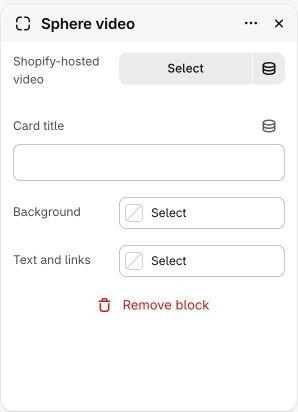
Settings overview
| Setting | Description | Options |
|---|---|---|
| Shopify-hosted video | Selects the video that plays in this block. | Shopify-hosted video. |
| Card title | Sets the title shown with this content. | Plain text. |
| Caption file URL (.vtt) | Sets the URL of the timed WebVTT caption track. Use a WebVTT caption file for this video. Set its language code, for example en or fr. | Shopify link picker or URL. Shown when Shopify-hosted video is set. |
| Caption language code | Identifies the language of the captions. | Plain text. Shown when Shopify-hosted video is set and Caption file URL (.vtt) is set. |
| Transcript and visual description | Provides text for the spoken content and relevant visual details. Provide the spoken content and relevant visual information. Add an audio-described version where needed. Reviews and media must be supplied and reviewed by the merchant. | Formatted text. Shown when Shopify-hosted video is set. |
| Background | Sets the surface color for this block. | Palette or custom color. |
| Text and links | Sets the foreground color for the text and links in this block. | Palette or custom color. |