Pairings and details
Group creator notes, policies and products that go with the current item.
How to customize
Open Products → Default product → Pairings and details. In Pairs well with, assign products and a heading. Add an Accordion block for each detail. Choose Description to show the current product description or Text or page to supply custom copy or a Shopify page.
Blocks
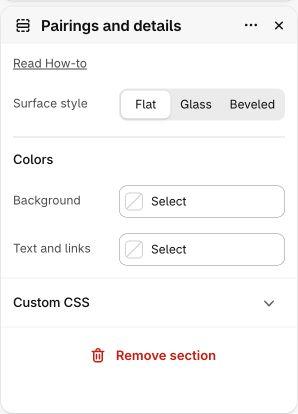
Settings overview
General
| Setting | Description | Options |
|---|---|---|
| Surface style | Sets the finish on the pairings and disclosure surfaces. | Flat, Glass, Beveled. |
Colors
| Setting | Description | Options |
|---|---|---|
| Background | Sets the section background. Leave blank to use its inherited color. | Palette color or custom color. |
| Text and links | Styles the section’s text and links. Check it against the background. | Palette color or custom color. |