Shop the scene chapter
Show a scene with links to selected products.
Available in Hero Book.
Set up the block
Choose the scene image and its products. Check that every product choice belongs with the scene and opens the expected destination.
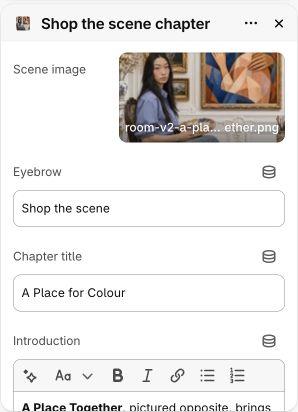
Settings overview
| Setting | Description | Options |
|---|---|---|
| Scene image | Selects the artwork shown in the block or on the spread. | Shopify image picker. |
| Eyebrow | Adds a short line above the title. | Plain text. |
| Chapter title | Sets the title shown in chapter navigation and where the chapter layout displays it. | Plain text. |
| Introduction | Sets the main formatted copy. | Formatted text. |
| Products in the scene | Selects the products listed on the facing page of the scene. | Shopify product list. |
Navigation
| Setting | Description | Options |
|---|---|---|
| Chapter navigation image | Sets the thumbnail in the chapter navigator and Contents. | Shopify image picker. |