FAQ
Organize answers so shoppers can open individual questions.
How to customize
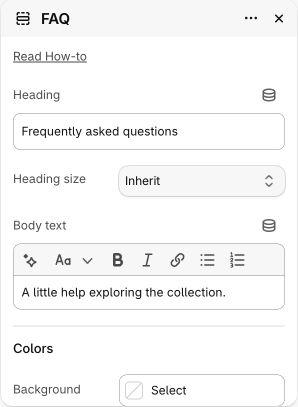
Use Heading, Heading size and optional Body text for an introduction. Choose Custom to open Custom font size. Choose Background and Text and links together.
Add one Question block for each item and set Question and Answer. Put common questions first. Select a block in the editor to see its answer open, then test opening and closing questions in the storefront preview with a keyboard. Link to a full policy when an answer needs more space.
Blocks
Settings overview
General
| Setting | Description | Options |
|---|---|---|
| Heading | The visible heading for this section. | Plain text. |
| Heading size | Sets the heading size. Choose Custom to enter a size in pixels. | Inherit, Small, Medium, Large, Extra large, Custom. |
| Custom font size | Sets the exact size of the section heading. | 12–120 px. Available when Heading size is Custom. |
| Body text | Adds rich text below the section heading. | Rich text. |
Colors
| Setting | Description | Options |
|---|---|---|
| Background | Sets the section background. Leave blank to use its inherited color. | Palette color or custom color. |
| Text and links | Styles the section’s text and links. Check it against the background. | Palette color or custom color. |