Rich text heading
Add a heading inside the Rich text section.
In the editor, this block is called Heading.
Available in Rich text.
Set up the block
Choose a size and keep the heading easy to scan.
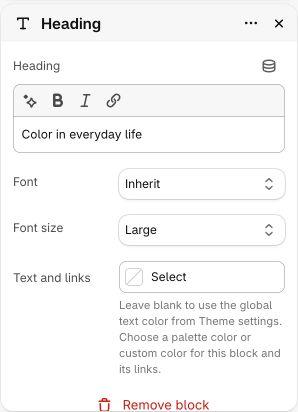
Settings overview
| Setting | Description | Options |
|---|---|---|
| Heading | Sets the heading shown in the block. | Formatted inline text. |
| Font | Chooses which typeface the block uses. | Inherit, Theme heading font, Theme body font, Custom. |
| Custom font | Chooses the specific typeface when Font is set to Custom. | Shopify font picker. Shown when Font is set to Custom. |
| Font size | Sets the size of the block’s text. | Inherit, Small, Medium, Large, Extra large, Custom. |
| Custom font size | Sets the maximum custom size of the block’s text. Maximum size. Large text scales down automatically on smaller screens. | 12–120 px in increments of 2. Shown when Font size is set to Custom. Default 24 px. |
| Text and links | Sets the foreground color for the text and links in this block. Leave blank to use the global text color from Theme settings. Choose a palette color or custom color for this block and its links. | Palette or custom color. |