Process / Making of
Show the stages behind a product, service or story.
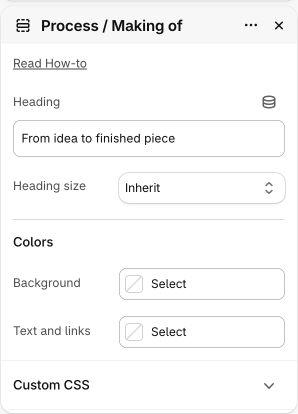
How to customize
Add Process / Making of. Use Step blocks for the stages. Add artwork, a short heading and an explanation to each step. Drag the blocks into sequence and test the final card on mobile.
Blocks
Settings overview
General
| Setting | Description | Options |
|---|---|---|
| Heading | The visible heading for this section. | Plain text. |
| Heading size | Sets the heading size. Choose Custom to enter a size in pixels. | Inherit, Small, Medium, Large, Extra large, Custom. |
| Custom font size | Sets the exact size of the section heading. | 12–120 px. Available when Heading size is Custom. |
Colors
| Setting | Description | Options |
|---|---|---|
| Background | Sets the section background. Leave blank to use its inherited color. | Palette color or custom color. |
| Text and links | Styles the section’s text and links. Check it against the background. | Palette color or custom color. |