Panel
Configure one half of Hero Split.
Available in Hero Split.
Set up the block
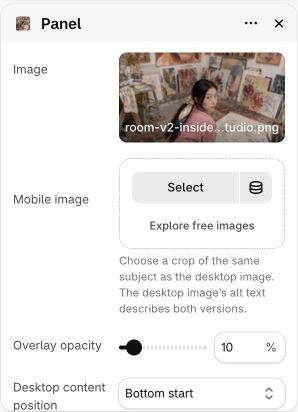
Pick desktop and mobile images, position the content, then add Heading, Text or Button inside the panel.
Blocks you can add
Settings overview
| Setting | Description | Options |
|---|---|---|
| Image | Selects the artwork shown in the block or on the spread. | Shopify image picker. |
| Mobile image | Uses an alternate crop of the desktop image on narrow screens. Choose a crop of the same subject as the desktop image. The desktop image’s alt text describes both versions. | Shopify image picker. |
| Overlay opacity | Changes how strongly the overlay obscures the image. | 0–100 % in increments of 5. Default 60 %. |
| Desktop content position | Positions the copy and buttons within the panel on desktop. | Top start, Top center, Top end, Middle start, Middle center, Middle end, Bottom start, Bottom center, Bottom end. |
| Desktop text alignment | Aligns the copy within its area on desktop. | Start, Center, End. |
| Mobile content position | Positions the copy and buttons within the panel on mobile. | Top start, Top center, Top end, Middle start, Middle center, Middle end, Bottom start, Bottom center, Bottom end. |
| Mobile text alignment | Aligns the copy within its area on mobile. | Start, Center, End. |
| Background | Sets the surface color for this block. Sets the color behind the image or placeholder. Overlay opacity can darken it. | Palette or custom color. |