Reviews
Present approved customer quotes and creator video.
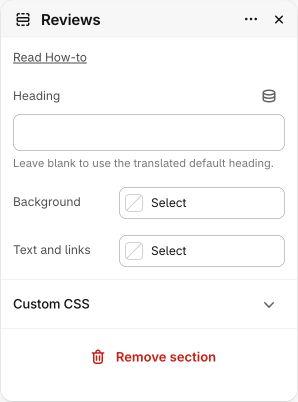
How to customize
Set the section’s Heading, Background, and Text and links, then add a Review or Creator video block.
| Block | Settings to fill in |
|---|---|
| Review | Add Review quote and Review attribution. Set Rating when appropriate. If you add Button link, set Link accessible name to explain the destination. |
| Creator video | Select the Video, choose Autoplay as needed, and add Cover image and Creator name. The Button link can point to related content. Use video media with captions or add a nearby transcript when the content needs one. |
Preview manual playback and the sequence on mobile. Ensure text remains readable over the selected surfaces.
Blocks
Settings overview
| Setting | Description | Options |
|---|---|---|
| Heading | The visible heading for this section. | Plain text. |
| Background | Sets the section background. Leave blank to use its inherited color. | Palette color or custom color. |
| Text and links | Styles the section’s text and links. Check it against the background. | Palette color or custom color. |