Theme editor basics
Open Online Store → Themes and select Edit theme for Passage. Choose a page type from the top-bar picker, then select a section or block on the left.
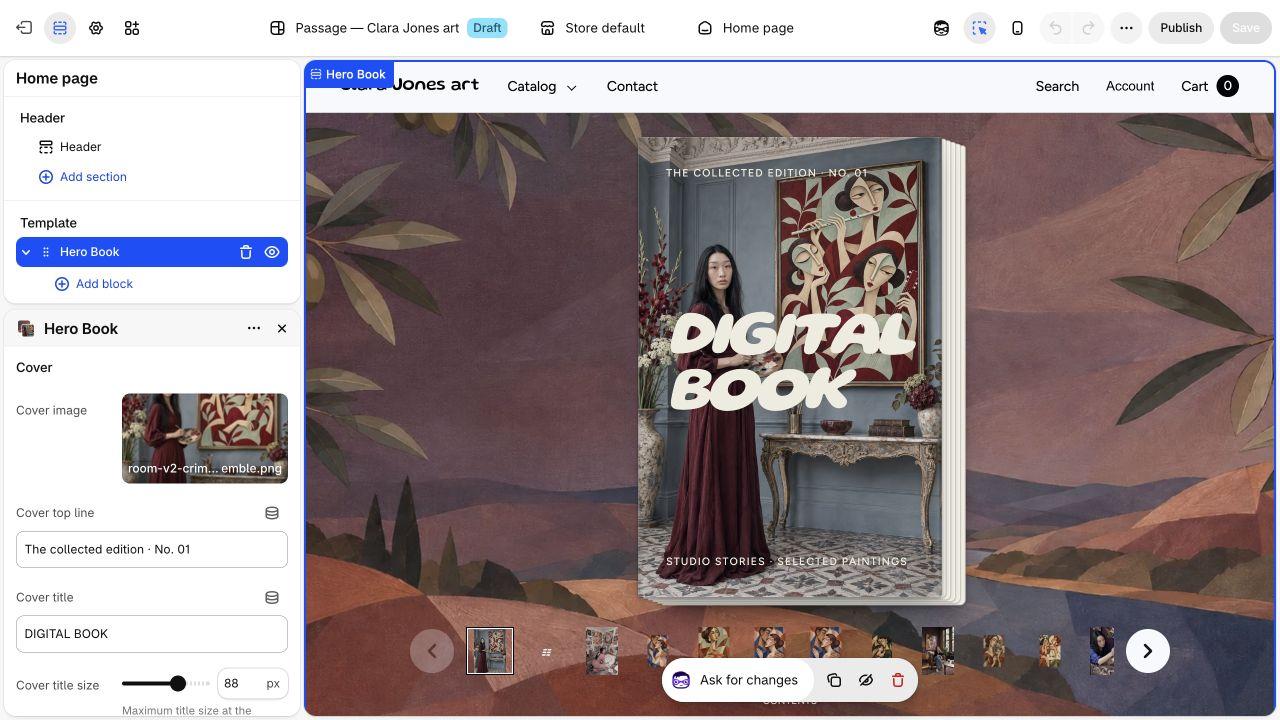
Find the right control
| Area | What to edit there |
|---|---|
| Theme settings | Logo, fonts, colors, shapes, layout, and social URLs across the store. |
| Template picker | The layout for a type of page, such as Product, Collection, or Search. |
| Sections | Large areas within the current template, including Hero Book and Featured journal. |
| Blocks | Editable contents inside a section, such as a chapter, button, or variant picker. |
Use Add section and Add block where available. Drag items in the sidebar to reorder them. Use the visibility control to hide an item while you evaluate a different layout. Use the top bar to preview desktop and mobile and review changes before saving.
Preview interactive sections
Select a chapter to bring it into view in Hero Book. Hero Sphere pauses while a section/card is selected or the inspector is active. Deselect it and turn off the inspector to try rotation and dragging as a shopper.