Variant picker
Choose how customers change product options.
Available in Product, Featured product.
Set up the block
Pick the display style, then try long option names, sold-out variants, swatches, and variant imagery where used.
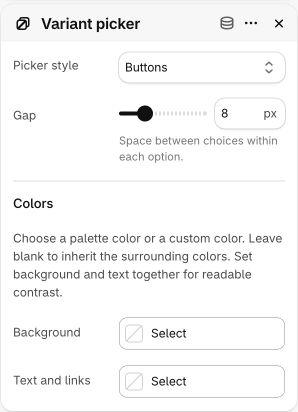
Settings overview
| Setting | Description | Options |
|---|---|---|
| Picker style | Selects how shoppers see and choose variant options. | Buttons, Color swatches, Variant images. |
| Gap | Adjusts the space between shoppers’ choices. Space between choices within each option. | 0–32 px in increments of 2. Default 8 px. |
| Image size | Scales the option images without changing their proportions. Scales variant images while keeping their original proportions. 100% uses the standard size. | 50–150 % in increments of 10. Shown when Picker style is set to Variant images. Default 100 %. |
Colors
| Setting | Description | Options |
|---|---|---|
| Background | Sets the surface color for this block. | Palette or custom color. |
| Text and links | Sets the foreground color for the text and links in this block. | Palette or custom color. |