Collection chapter
Give a Shopify collection its own spread.
Available in Hero Book.
Set up the block
Choose the collection and select artwork for the facing page. Check that its products and the collection link open the intended destinations.
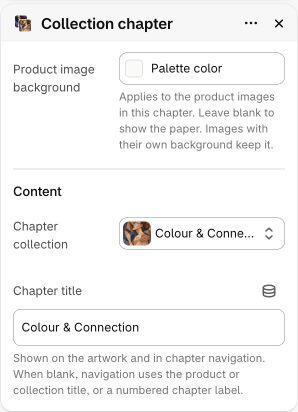
Settings overview
| Setting | Description | Options |
|---|---|---|
| Product image background | Sets the surface behind the image. Applies to the product images in this chapter. Leave blank to show the paper. Images with their own background keep it. | Palette or custom color. |
Content
| Setting | Description | Options |
|---|---|---|
| Chapter collection | Selects the collection featured by this block. | One Shopify collection. |
| Chapter title | Sets the title shown with this content. Shown on the artwork and in chapter navigation. When blank, navigation uses the product or collection title, or a numbered chapter label. | Plain text. |
Artwork
| Setting | Description | Options |
|---|---|---|
| Chapter artwork | Selects the chapter artwork placed on its artwork page. | Shopify image picker. |
Navigation
| Setting | Description | Options |
|---|---|---|
| Chapter navigation image | Sets the thumbnail in the chapter navigator and Contents. | Shopify image picker. |